AI सबटाइटल अनुवाद टूल्स 2026: 6 प्लेटफ़ॉर्म जो एक ही pass में अनुवाद + Burn-in करते हैं
AI सबटाइटल अनुवाद टूल्स 2026: 6 प्लेटफ़ॉर्म जो एक ही pass में अनुवाद + Burn-in करते हैं
विषय-सूची
- कौनसा AI सबटाइटल अनुवाद टूल वीडियो में सबटाइटल वापस burn करता है?
- Picking Dimensions: Translate + Burn-in एक step क्यों होना चाहिए
- 6 AI सबटाइटल अनुवाद टूल्स की तुलना
- Use Case से: Creator, Enterprise, Learner
- BibiGPT की Edge: अनुवाद से परे, Knowledge Artifacts में
- FAQ
- Wrap-up
कौनसा AI सबटाइटल अनुवाद टूल वीडियो में सबटाइटल वापस burn करता है?
त्वरित उत्तर: अगर आप एक टूल चाहते हैं जो आपके audio/वीडियो का अनुवाद करे और सबटाइटल को सीधे final file में burn करे, BibiGPT 2026 में सबसे hands-off AI सबटाइटल अनुवाद टूल है — upload पर अपनी target भाषा tick करें, सिस्टम transcription के दौरान अनुवाद करता है, और आप एक hard-subbed short वीडियो या bilingual SRT एक क्लिक में एक्सपोर्ट कर सकते हैं। अगर आप पहले से ही वीडियो editor के अंदर रहते हैं, Descript या CapCut का “Auto Translate + Burn-in” अधिकांश मामलों को कवर करता है। नीचे, हम सभी 6 tools को 5 dimensions पर साइड-बाय-साइड रखते हैं ताकि आप 10 मिनट में चुन सकें।
2026 में सबटाइटल अनुवाद race “केवल अनुवाद” से “अनुवाद + burn-in + सारांश + repurpose” तक विकसित हो गई है। Global जाने वाले Creators, cross-border enterprise training, language learners — सभी 3 tools को 1 में collapse करना चाहते हैं।
यह लेख आपको 6 mainstream विकल्पों के बीच real gaps दिखाएगा:
- कौन सा अनुवाद quality human लगती है, machine नहीं
- कौन सा burn-in (hard subs) painless बनाता है
- कौन सा अभी भी downstream editing के लिए bilingual SRT एक्सपोर्ट करता है
- कौन सा आगे जाता है — auto-summary, माइंड मैप, articles और shorts में repurposing
Picking Dimensions: Translate + Burn-in एक Step क्यों होना चाहिए
त्वरित उत्तर: एक production-grade AI सबटाइटल अनुवाद टूल को एक साथ 5 चीज़ें कवर करनी चाहिए — अनुवाद quality, burn-in (hard subs), bilingual SRT एक्सपोर्ट, प्लेटफ़ॉर्म कवरेज, और अनुवाद के बाद एक “next step”। एक भी miss करें और आप 3 apps juggling पर वापस।
एक typical दर्दनाक workflow ऐसा दिखता है:
- Whisper / DeepL के साथ SRT में अनुवाद करें
- SRT को Premiere / CapCut में drag करें, timing और styling fix करें
- Burn-in और एक्सपोर्ट — महसूस करें कि timing drift हुई, repeat
One-stop tools उन 3 steps को एक action में compress करते हैं। यहाँ 5 must-have dimensions हैं:
| Dimension | यह क्या check करता है | क्यों मायने रखता है |
|---|---|---|
| अनुवाद quality | क्या यह idioms, terminology, register रखता है? | Stiff MT पर viewers जल्दी drop off करते हैं |
| Burn-in | One-click hard subs? | TikTok / Shorts / Reels इस पर निर्भर करते हैं |
| Bilingual SRT एक्सपोर्ट | Original + translated lines preserved? | Repurposing के लिए ज़रूरी |
| प्लेटफ़ॉर्म कवरेज | YouTube / Bilibili / लोकल files? | डाउनलोड + re-encode बचाता है |
| Next step | Auto-summary, माइंड मैप, article repurposing? | अनुवाद को नॉलेज artifact में बदलता है |
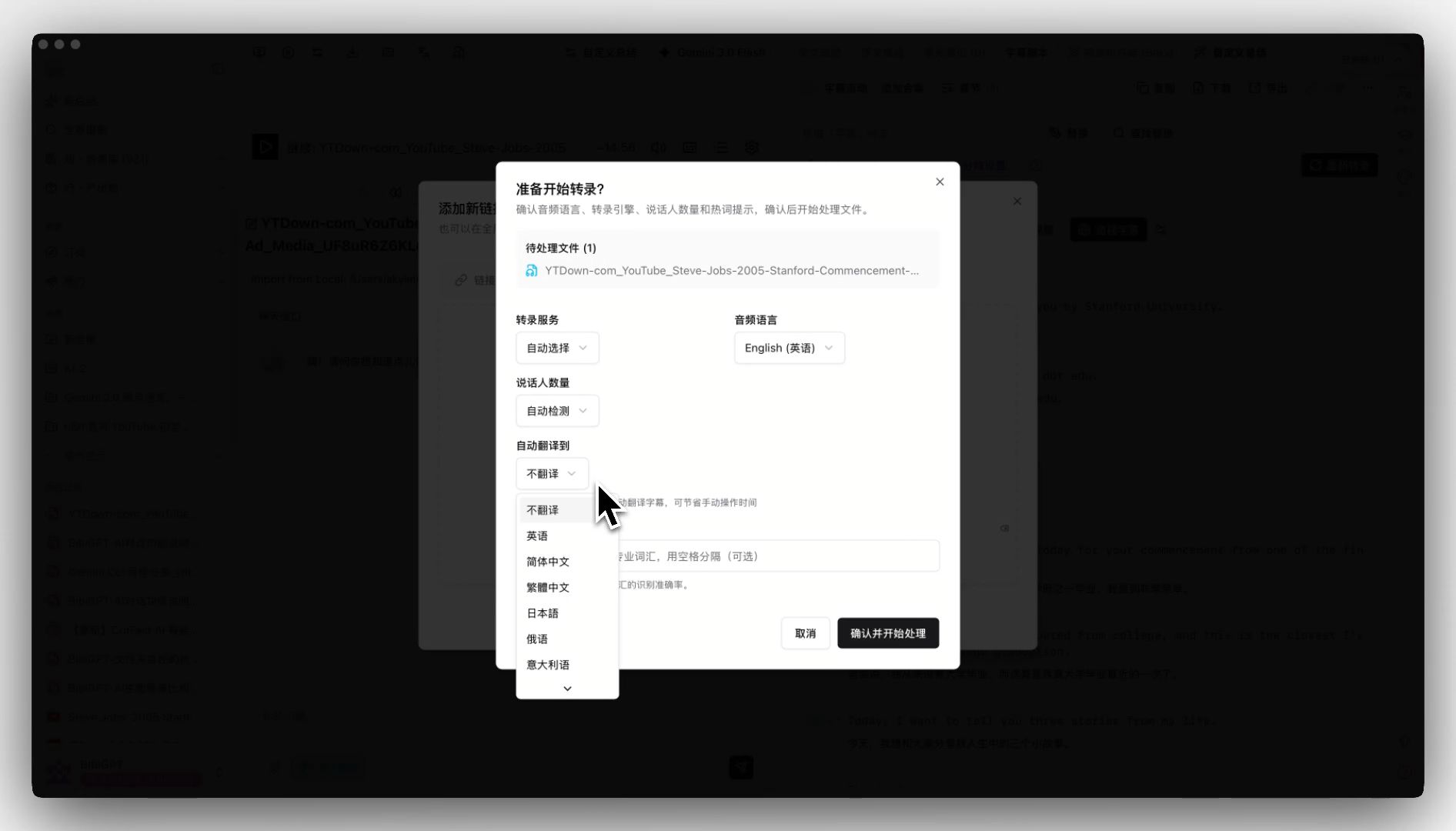
BibiGPT का auto-translate on upload पहले दो steps को collapse करता है: upload पर एक target भाषा चुनें, transcription + अनुवाद एक साथ चलते हैं।
6 AI सबटाइटल अनुवाद टूल्स की तुलना
त्वरित उत्तर: 6 tools में से प्रत्येक का अलग sweet spot है — BibiGPT एक ही pass में “translate + burn-in + summarize” पर जीतता है, Descript editing workflow के अंदर जीतता है, CapCut mobile speed पर जीतता है, Veed / Kapwing zero-install browser tools के रूप में जीतते हैं, Subtitle Edit professional timeline control के लिए जीतता है।
1. BibiGPT — Translate, Burn-in, Summarize, सब एक Pass में
BibiGPT का core bet: अनुवाद शुरुआत है, अंत नहीं। Upload पर, एक target भाषा चुनें (EN→ZH, JA→ZH, KO→EN, etc.)। Transcription और AI अनुवाद एक साथ चलते हैं, और जब तक आप पलक झपकते हैं तब तक आपके पास एक bilingual subtitle track, एक स्ट्रक्चर्ड सारांश, और टाइमस्टैम्प highlight notes होते हैं।
- एक upload, और आपको अनुवाद + transcription + सारांश + माइंड मैप मिलते हैं
- 30+ प्लेटफ़ॉर्म से लिंक paste करें — स्रोत वीडियो डाउनलोड करने की ज़रूरत नहीं
- अनुवाद के बाद, hard-subbed short वीडियो (MV Editor) या एक clean SRT एक क्लिक में एक्सपोर्ट करें
- SRT sync एक्सपोर्ट के साथ pair करें ताकि Premiere या CapCut desktop के लिए लोकल
/srtfolder में copy ऑटो-drop हो
सबसे अच्छा किसके लिए: global creators, cross-border training teams, language learners।
2. Descript — Editor के अंदर “Text Is Video”
2026 में Descript ने Overdub (voice clone) + Translate को एक button में merge किया — आप caption को दूसरी भाषा में फिर से लिखते हैं, यह original speaker की voice के साथ redub करता है। Vlogs और course explainers के लिए, यह “edit script = edit audio” flow slick है।
- ताक़त: editor + translate + redub all-in-one
- सीमा: pricey (Pro $24/mo up), छोटी भाषाओं के लिए uneven सपोर्ट
सबसे अच्छा किसके लिए: English-first vloggers, course instructors।
3. CapCut — सबसे तेज़ Mobile Auto Translate + Burn-in
ByteDance के CapCut ने 2026 में “auto captions → translate → burn-in” को एक panel में baked किया; आप अपने फ़ोन पर 3 मिनट में एक finished vertical वीडियो ship कर सकते हैं। TikTok / Reels / Shorts creators के लिए, यह plug-and-play है।
- ताक़त: mobile end-to-end, template-driven shipping
- सीमा: अनुवाद short-form के लिए tuned; quality long videos पर wobbles
4. Veed — एक Browser-Based One-Stop Subtitle Editor
Veed का killer फ़ीचर “no install” है। Browser में एक वीडियो drop करें, Auto Translate क्लिक करें, 5 मिनट इंतज़ार करें — आपको bilingual SRT + burned-in वीडियो मिलता है। आप उसी पेज में font, color और position fine-tune कर सकते हैं।
- ताक़त: zero install, साफ़ UI, broad language सपोर्ट
- सीमा: free tier में watermark + length cap है
5. Kapwing — Collaborative Teams के लिए Subtitle Translation
Kapwing collaboration पर झुकता है — multiple editors एक ही project में captions और translations edit कर सकते हैं। In-house media teams और marketing departments के लिए शानदार।
- ताक़त: multi-editor + versioning
- सीमा: pacing Veed से धीमी, अनुवाद third-party APIs पर निर्भर
6. Subtitle Edit — Pros के लिए Open-Source Favorite
Films और documentaries पर काम करने वाले translators जो millisecond timing की demand करते हैं वे Subtitle Edit चुनेंगे — open source, free, कई अनुवाद APIs सपोर्ट करता है। Burn-in के लिए FFmpeg चाहिए; यह अधिक steps हैं लेकिन पूरी तरह आपके control में।
- ताक़त: professional, free, कोई watermark नहीं
- सीमा: steep learning curve, burn-in external है
Use Case से: Creator, Enterprise, Learner
त्वरित उत्तर: अपने परिदृश्य को “primary tool → fallback” pair पर map करें। सबसे जटिल वाले से शुरू न करें।
| परिदृश्य | Primary | Fallback |
|---|---|---|
| एक वीडियो को जल्दी decode करने वाला Language learner | BibiGPT (translate + structured summary + flashcards) | Veed |
| YouTube / TikTok के लिए localizing करने वाला Creator | BibiGPT (translate + MV short वीडियो burn-in) | CapCut |
| मल्टीलिंगुअल versions बनाने वाला English vlogger | Descript (voice clone) | BibiGPT + manual dub |
| Enterprise cross-border training | BibiGPT (collection summary + bilingual SRT) | Kapwing |
| Documentary / film subtitle fine-tuning | Subtitle Edit (ms-level timing) | + पहले draft के लिए BibiGPT |
| Mobile पर editing करने वाले TikTok / Reels creators | CapCut (end-to-end) | Pre-processing के लिए BibiGPT |
Cambridge English से research दिखाता है कि bilingual सबटाइटल वीडियो learning retention को monolingual के मुकाबले लगभग 25% बढ़ाते हैं — इसलिए BibiGPT bilingual को default बनाता है: कई users single-language captions पर वापस नहीं जाते।
BibiGPT की Edge: अनुवाद से परे, Knowledge Artifacts में
त्वरित उत्तर: BibiGPT का सबसे बड़ा विभेदक “translate + burn-in” को नॉलेज pipeline की शुरुआत के रूप में मानना है, अंत के रूप में नहीं। अनुवाद के बाद, आप एक-क्लिक में AI highlight notes, माइंड मैप, small-red-book-style image posts, और दो-होस्ट podcast audio में जा सकते हैं।
Hard-sub OCR: उन videos के लिए जिनमें पहले से subs burned हैं
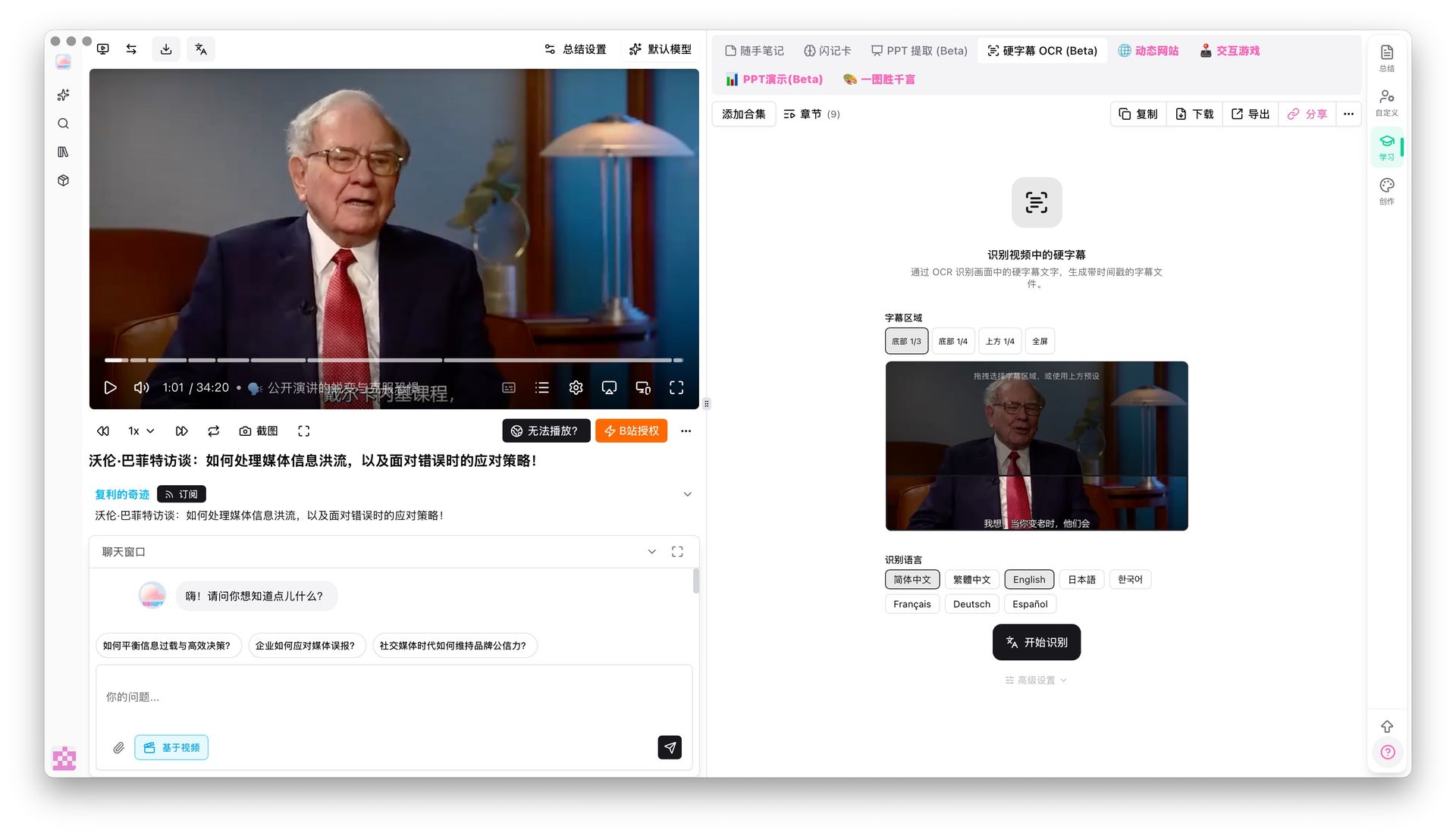
जब विदेशी वीडियो जिसका अनुवाद आप करना चाहते हैं उसमें पहले से subs frame पर burned हैं (interviews, online courses, film clips), speech-to-text drift कर सकता है। BibiGPT का hard-sub OCR (Beta) सीधे pixels से text pulls करता है और इसे अनुवाद pipeline में feed करता है — pure ASR से कहीं अधिक सटीक।
Smart subtitle segmentation: choppy lines को readable paragraphs में बदलें

Freshly translated subs अक्सर choppy होते हैं, जो SEO और repurposing को hurt करता है। BibiGPT का smart subtitle segmentation one-click presets (Short / Long / CJK-optimized) और line-count changes का live preview प्रदान करता है (जैसे 174 lines → 38), ताकि script तुरंत readable हो।
Translate → Summary → Posts → Podcast — एक production line
BibiGPT का full flow ऐसा दिखता है:
- विदेशी वीडियो upload करें + target भाषा चुनें (auto-translate on)
- सिस्टम outputs: bilingual सबटाइटल + AI सारांश + माइंड मैप
- एक-क्लिक small-red-book image posts, WeChat-style articles, short videos (MV Editor) में
- एक SRT चाहिए? SRT sync एक्सपोर्ट आपके लोकल folder में एक ऑटो-drop करता है
इसके विपरीत, Descript / Veed “subs + वीडियो” पर रुकते हैं। Downstream नॉलेज work (summary, posts, podcast) के लिए अभी भी अन्य tools चाहिए। आगे पठन: AI सबटाइटल अनुवाद bilingual workflow और YouSubtitles विकल्प।
FAQ
Q1: कौन सा टूल चीनी / जापानी / कोरियाई को सबसे अच्छा सपोर्ट करता है?
A: BibiGPT चीनी और पूर्व एशियाई users के लिए natively डिज़ाइन किया गया है; ZH / JA / KO / Traditional Chinese / English के बीच अनुवाद quality consistently मज़बूत है, विशेष रूप से तकनीकी terms और idioms के लिए। Descript / Veed English → European languages पर मज़बूत हैं।
Q2: क्या मैं TikTok / Reels के लिए short वीडियो में translated subs burn कर सकता हूँ?
A: हाँ। BibiGPT का MV Editor अनुवाद के तुरंत बाद TikTok, Reels और Shorts के लिए size किए गए hard-subbed short videos produce करता है। CapCut भी ऐसा करता है, लेकिन आप templates manually चुनते हैं।
Q3: क्या मैं अधिक editing के लिए SRT को Premiere / Final Cut में ले जा सकता हूँ?
A: हाँ। BibiGPT standard SRT एक्सपोर्ट करता है और लोकल folder में auto sync सपोर्ट करता है ताकि Premiere / Final Cut / CapCut desktop इसे तुरंत pick up कर सकें।
Q4: क्या free tier पर्याप्त है?
A: BibiGPT का free कोटा individual use के लिए प्रति दिन 2-3 videos कवर करता है; CapCut free में watermarks हैं; Veed free एक्सपोर्ट length cap करता है; Subtitle Edit पूरी तरह free है लेकिन आपका अपना अनुवाद API चाहिए।
Q5: Long videos (2h+) के बारे में क्या?
A: BibiGPT long videos asynchronously process करता है और पूरा होने पर आपको notify करता है। CapCut / Veed long files के साथ struggle करते हैं; Subtitle Edit locally किसी भी length को handle करता है लेकिन अधिक समय लेता है।
Wrap-up
2026 में, AI सबटाइटल अनुवाद एक-dimensional “कौन अधिक सटीक अनुवाद करता है” race नहीं है — यह इस बारे में है कि कौन अनुवाद, burn-in, summarization और repurposing को एक line में stitch कर सकता है। BibiGPT सबसे आगे जाता है: link paste करने से लेकर hard-subbed final + bilingual SRT + AI सारांश + माइंड मैप पाने तक बिना कभी apps switch किए।
अगर आपको बस “एक बार translate करें, एक बार burn-in करें, done” चाहिए, Descript / CapCut / Veed बिल्कुल ठीक हैं। लेकिन अगर आप global distribution, cross-border training, या language learning के लिए नियमित रूप से foreign videos process कर रहे हैं, BibiGPT जोड़ना “एक अनुवाद” को “एक पूरे नॉलेज artifact” में upgrade करता है।
अभी अपनी AI कुशल सीखने की यात्रा शुरू करें:
- 🌐 आधिकारिक वेबसाइट: https://aitodo.co
- 📱 मोबाइल डाउनलोड: https://aitodo.co/app
- 💻 डेस्कटॉप डाउनलोड: https://aitodo.co/download/desktop
- ✨ और फ़ीचर्स जानें: https://aitodo.co/features
BibiGPT Team